(
)
Website Audit Checklist: The Step-by-Step 2026 Guide
Traffic is coming in. The ads are running. But conversions are flat, and nobody can explain why. The site looks fine at a glance. The design is clean, the pages load, and the checkout works. Something is still leaking revenue, quietly, every single day.
That gap between "looks fine" and "actually works" is exactly what a structured website audit is built to find. At DEUX Labs, we run a full audit before touching a single A/B test or CRO experiment. The principle is simple: before you test anything, you audit everything. This website audit checklist is the same step-by-step framework we use, adapted for independent use.
This guide covers six core audit areas: technical SEO, page speed, on-page content, UX and conversion elements, security, and accessibility. You'll need a handful of free tools (listed in section one), and you'll want an audit tracking template ready before you start crawling. Start with setup.
How to Set Up Your Website Audit Checklist Before You Start Checking Anything
Choose your audit tools (free options that actually work)
You don't need an expensive stack to run a solid first-pass audit. The minimum viable toolkit covers every area in this guide: Google Search Console for indexation and coverage data, PageSpeed Insights for Core Web Vitals, Screaming Frog's free tier for crawling up to 500 URLs (note the 500-URL cap on the free version and expect a short GSC data lag of 2, 3 days), WAVE for accessibility scanning, and Chrome DevTools for mixed content and performance diagnostics. These five tools, used together, surface the large majority of technical and conversion issues that matter for SEO, particularly on sites under a few hundred pages where the Screaming Frog limit isn't a constraint. (If you want a quick clarity check before you begin, try our 3-Second Audit.)
Define your audit scope and prioritize pages
Auditing every page at once is inefficient and leads to analysis paralysis. Instead, pull your top pages from Google Analytics or Google Search Console and focus your effort where traffic and revenue actually flow. Your priority list should include the homepage, main landing pages, high-traffic blog posts, and conversion-critical pages like checkout, contact, demo request, and sign-up. For smaller sites, focus on your highest-traffic and highest-revenue pages first; for larger sites, sample by tier, top 10% by traffic, top converting pages, and any pages running paid spend. A focused audit on your most important pages delivers more usable findings than a shallow pass across hundreds of URLs.
Set up a tracking template before you crawl
A good audit tracking template is the difference between actionable findings and a list that collects dust. Set up a simple spreadsheet with columns for URL, issue type, severity (critical, medium, or low), fix owner, and status. You'll populate this as you work through each section below. Having the structure in place before you start means you capture findings in real time instead of trying to reconstruct them later.
Website Audit Checklist: Technical SEO and Crawlability
Check your sitemap, robots.txt, and indexability
Your XML sitemap should contain only canonical URLs that return a 200 status and are intended to rank. A sitemap full of redirects, noindex pages, or parameter variants wastes crawl budget and sends mixed signals to Google. Submit your sitemap through Google Search Console and cross-reference it with the Coverage report to surface any crawl errors, excluded pages, or noindex flags you didn't intend. After Google's December 2025 Rendering Update, non-200 pages are excluded from rendering entirely, making clean crawl signals more critical than ever. Use a comprehensive technical SEO checklist to ensure you don't miss common crawlability problems.
On robots.txt, the most common mistake is accidental blocking. Overly broad disallow rules can hide important JavaScript files, navigation assets, or entire page categories from Googlebot Smartphone, the crawler that handles mobile-first indexing. A blocked CSS or JavaScript file, for example, can prevent Google from rendering your pages correctly, which directly suppresses rankings. Test your robots.txt directly in Search Console to confirm nothing critical is being blocked.
Audit canonical tags and redirect chains
Every page should have a self-referencing canonical tag. Without it, Google makes its own guess, which doesn't always go the way you'd hope. Faceted navigation is a common trap: URL parameters like ?sort=price or ?color=red can generate hundreds of near-duplicate pages that dilute authority across your site. Check that canonical tags point to the correct canonical version and that parameter pages aren't being indexed by accident. Redirect chains should stay under three to five hops; anything longer slows crawling and can lose link equity. Flag redirect loops and any 404s that are incorrectly returning a 200 status, both are quiet ranking killers most teams overlook entirely.
Validate structured data and hreflang (if applicable)
Schema markup is no longer optional for sites that want visibility in AI-generated search features. Validate your JSON-LD using Google's Rich Results Test and confirm that schema types match the actual content on the page. For multilingual or multi-region sites, hreflang tags need to be bidirectional and aligned with your canonical setup. Even a single syntax error can confuse Google's understanding of your content hierarchy and suppress the wrong language variant in search results.
Website Audit Checklist: Page Speed and Core Web Vitals
The three Core Web Vitals Google uses as page experience ranking signals in 2026
Google's Core Web Vitals are three specific signals evaluated on real-user field data, not lab simulations. Largest Contentful Paint (LCP) measures loading performance and should be under 2.5 seconds. Interaction to Next Paint (INP) measures responsiveness to clicks and taps and should stay under 200 milliseconds. Cumulative Layout Shift (CLS) measures visual stability and should be under 0.1. Add Time to First Byte (TTFB) as a supporting metric with a target under 100 milliseconds, since slow server response time drags all three Core Web Vitals down. According to HTTP Archive data, roughly 47 to 53 percent of websites globally pass all three thresholds, which means even sites with decent scores likely have room to improve. See Google's official Core Web Vitals documentation for measurement details and thresholds.
How to run a quick performance audit on any page
Start with PageSpeed Insights on mobile. Mobile-first indexing means your mobile experience is what Google evaluates for rankings, so desktop scores are secondary. Run the test, then dig into Lighthouse for detailed diagnostics on what's causing the failures. The most common culprits are unoptimized images, render-blocking JavaScript, missing HTTP/3, and absent or weak cache policies. These aren't obscure technical edge cases; they show up on the majority of sites that haven't been performance-tuned intentionally.
Performance budget: what to track beyond the score
A one-time audit captures a snapshot; a performance budget creates accountability over time. Set threshold targets for your most important pages and flag any month-over-month regression. Google Analytics 4's real-user monitoring data makes this possible without third-party tooling. Track performance continuously, not as a box to check at launch, especially after new features, plugins, or third-party scripts get added to the site.
On-Page SEO and Content Quality Audit
Title tags, meta descriptions, and heading structure
Every page needs a unique title tag between 50 and 60 characters, with the primary keyword frontloaded, and a meta description under 160 characters that matches what the searcher actually wants. Screaming Frog's "Page Titles" and "Meta Description" exports make it easy to spot duplicates and missing values across your entire crawl. For heading structure, confirm there's exactly one H1 per page, followed by a logical H2 and H3 hierarchy with no skipped levels. Missing or duplicate title tags consistently rank among the highest-impact quick fixes in any SEO audit checklist because they're low effort with real SEO upside.
Spotting thin content and keyword cannibalization
Thin content, pages with no meaningful depth, scraped copy, or boilerplate text, signals low quality to Google and dilutes the authority of your stronger pages. The right word count threshold varies by intent: a transactional page may convert well at 200 words, while an informational guide typically needs 1,000 or more to demonstrate depth. Flag thin pages for consolidation or enrichment based on the intent they're targeting, not a fixed word count alone. Keyword cannibalization is a related problem: when multiple pages compete for the same search term, they split impressions that should belong to one authoritative page. Cross-reference your top keywords with the "Queries" report in Google Search Console to identify which pages are competing against each other for the same traffic.
E-E-A-T signals: what auditors look for now
Google's quality raters evaluate Experience, Expertise, Authoritativeness, and Trustworthiness. In practice, this means checking for named authors with bios, citations and external sources, schema markup for Article, Review, or Person types, and strong internal linking to authoritative hub pages. These signals matter most on YMYL topics (Your Money or Your Life), but they apply to any category where trust drives the conversion decision. If your content reads like it was written by no one in particular, that's the conclusion Google's systems tend to reach as well.
UX, CTAs, and Conversion Elements
Evaluating your calls to action and form experience
A CTA audit starts with a single question: does every important page have one clear next step? Check CTA placement (above the fold on key landing pages), button copy (action verbs, not generic "Submit"), contrast, and tap target size on mobile. For forms, confirm every field has a visible label and ask whether every field is actually necessary. A contact form with seven fields when three would do is a conversion killer hiding in plain sight. In practice, significantly reducing form length ranks among the most reliable quick wins we see in conversion audits, many CRO studies report meaningful lift when teams cut unnecessary fields by a third or more. For prioritized UX fixes you can implement quickly, see our 11 UX Changes That Lift Website Conversions.
Mobile responsiveness and layout on real devices
Run a mobile-friendliness test, then actually scroll through your most important pages on a real phone. Check that tap targets aren't overlapping, text isn't truncating, images aren't overflowing containers, and hamburger menus work correctly from top to bottom. Mobile traffic now represents the majority of sessions on most sites, estimates from sources like Statista and Google's own data consistently put mobile's share above 60 percent, and conversion rates on mobile still lag desktop by a significant margin, largely because of friction that only shows up when you're actually using the page with your thumb.
Where DIY audits hit their limits
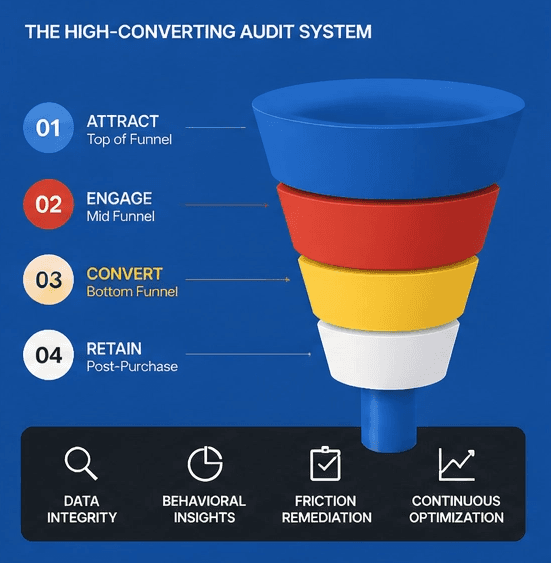
A structured checklist surfaces what's visible in the code and layout. But the highest-impact conversion issues, rage clicks, scroll depth drop-offs, form abandonment patterns, and hesitation before key decisions, only show up in behavioral data. This is where a specialist audit goes beyond the checklist. The DEUX Labs audit process layers in session replay analysis, heatmaps, and a prioritized optimization roadmap tied to revenue impact, not just issue severity. If your findings from this guide feel overwhelming to prioritize, or you want to understand the behavioral patterns driving drop-off, that's exactly where we come in. Read the Anatomy of a High-Converting Audit to see our step-by-step remediation process.
Security, Accessibility, and Prioritizing Your Fixes
Security checks every site needs to pass
Start with the basics: is the entire site on HTTPS with a valid certificate? Load Chrome DevTools and check the Console for mixed content warnings, which occur when HTTP resources like scripts or images are loading on an HTTPS page. Mixed content allows attackers to inject malicious code or hijack sessions, even on an otherwise secure site. Check response headers using securityheaders.com for a fast audit of HSTS enforcement, Content Security Policy configuration, and other header-level protections. For JavaScript dependencies, run Retire.js to surface vulnerable libraries that are commonly overlooked in standard audits. If you need practical steps for how to find and fix these warnings, see this guide on how to find and fix mixed content warnings.
Accessibility: the seven checks you can't skip
The most commonly failed WCAG checkpoints are also the easiest to catch early. Run WAVE or Axe on your key pages, then manually tab through the page to verify focus order and keyboard navigation. Research from WebAIM and accessibility testing labs consistently shows that automated tools catch roughly 30 to 50 percent of accessibility issues; manual verification fills the gap. For more detail on typical failures, review the most common WCAG failures. The seven checkpoints to confirm are:
Sufficient color contrast on all text (minimum 4.5:1 ratio)
Descriptive alt text on all meaningful images
Labeled inputs on every form field
Descriptive text on all links and buttons (no empty or icon-only elements)
Visible keyboard focus indicators on all interactive elements
Logical heading hierarchy with no skipped levels
A
langattribute on the HTML element
How to triage and prioritize your audit findings
Every issue on your list competes for the same limited development time, so prioritization isn't optional, it's the audit. Use a simple impact-effort matrix to sort your findings. Critical issues get fixed first: indexability errors, security gaps, Core Web Vitals failures on high-traffic pages. Medium-priority issues go into the next sprint: thin content, CTA friction, form UX problems, and accessibility failures on conversion pages. Low-priority issues get batched: cosmetic inconsistencies, minor meta optimizations, and cleanup on low-traffic pages. Record every finding in your tracking template with a severity rating, an owner, and a target date. Findings without owners don't get fixed. That's the single most common reason audit value gets left on the table.
Run the Audit, Then Run It Again
A website audit isn't a one-time event. It's a quarterly habit. Sites change constantly: new pages get added, plugins get updated, campaigns drive traffic to pages that were never built to convert. This website audit checklist covers six discrete areas, technical SEO, page speed, on-page content, UX and conversion elements, security, and accessibility, and together they give you a complete picture of site health, not just a partial view from a single tool. Run it quarterly. Update your tracking template each time. The compounding effect of consistent audits outperforms any single round of fixes.
Working through this website audit checklist yourself is a strong first step. You'll surface real issues, prioritize real fixes, and start moving the metrics that matter. If the findings feel overwhelming to stack-rank, or you want to layer in the behavioral data that code-level audits can't capture, session recordings, heatmaps, funnel analysis, book a free strategy call with DEUX Labs. We'll bring fresh eyes, a tested framework, and a prioritized roadmap focused on turning your findings into measurable revenue gains.
More Insights
Explore ideas, tips, and trends to elevate your brand.