(
)
11 UX Changes That Lift Website Conversions (Ranked)
Many businesses facing a conversion problem do the same thing: buy more traffic. They increase ad spend, chase new channels, and double down on campaigns, all while ignoring the fact that their existing visitors are already leaving without converting. The problem isn't the traffic. It's what happens after the click.
Understanding what UX changes improve website conversions the most is one of the highest-leverage questions in digital marketing, because the answer rarely involves touching your ad budget. A handful of targeted UX improvements, applied in the right order, consistently produce measurable conversion lifts on existing traffic. Across published case studies and industry research, the same friction points surface again and again: in e-commerce, SaaS, hospitality, and nonprofit sites alike. The patterns are predictable, the fixes are testable, and the data is unambiguous.
Below are 11 UX changes ranked by published impact, with real lift numbers to help you prioritize where to focus first.
1. CTA optimization: the highest-leverage place to start
Every other UX improvement on this list funnels visitors toward a single moment: the call-to-action. When your CTA fails, everything upstream of it was wasted effort. This is why CTA optimization consistently tops conversion rate optimization rankings, fixing it pays dividends across every other improvement you make.
In one nonprofit case study, layout and CTA changes alone drove a 600% increase in report downloads, a 145% lift on the homepage, and a 97% uplift in annual reports. The mechanism wasn't magic. It was removing competing paths, making the primary action obvious, and placing the CTA where visitors were already looking.
Placement: follow the reader's decision journey
The above-the-fold versus end-of-page debate misses the point. Placement should follow the reader's decision-making process, not a rule of thumb. A short landing page with a single offer warrants a high CTA. A complex product page with multiple features needs time to build the case before asking for a click. Multi-placement CTAs, hero, mid-scroll, and footer, often outperform single-position buttons by catching visitors at different stages of readiness. Test placement variations to confirm what works for your specific audience before committing to a layout.
Copy: specificity reduces hesitation
"Submit" tells a visitor nothing. "Get My Free CRO Audit" sets a clear expectation and matches the intent of someone in research mode. The principle is simple: specific copy reduces the cognitive gap between clicking and knowing what happens next. Copy should also match funnel stage. Someone on a pricing page comparing plans needs different language than someone who just finished reading a case study and is ready to act.
Color, size, and whitespace
Mobile buttons need a minimum tap target of 44x44 pixels. Desktop buttons perform best in the 40, 60px height range with generous padding on all sides. Whitespace around the button draws the eye; clutter competes with it. On color: contrast matters more than the specific hue. The standout effect, how much the button separates visually from everything around it, drives clicks more reliably than color psychology debates about orange versus green.
2. Page load speed: a UX problem, not a technical one
Every second of load time is a friction point. Visitors don't experience page speed as a technical issue; they experience it as impatience, doubt, and eventually a decision to leave. Framing speed as a UX problem changes how your team prioritizes it.
A 1-second delay reduces conversions by 7% on average. A site loading in 1 second versus 5 seconds is 2.5x more likely to convert B2C visitors and 3x more likely for B2B. These figures come from Google and Portent research, and the gap only widens over time: a site at 1 second versus 10 seconds shows a 5x conversion advantage in B2B contexts.
Why mobile speed is a different problem entirely
Mobile users have shorter patience and higher abandonment rates. Sites loading in 1 second convert at around 40% on mobile; at 3 seconds, that drops to 29%. Some 53% of mobile visitors abandon a page that takes more than 3 seconds to load, and every additional second of delay can cut conversions by up to 20% (Google, 2018).
The gains from improvement are equally pronounced. Every 0.1-second improvement in load time translates to an 8.4% conversion gain in e-commerce, according to Deloitte research. Walmart's mobile redesign, which combined speed improvements with navigation simplification, produced a 20% lift in mobile conversions. Speed and UX are not separate levers on mobile. They're the same one.
3. Form simplification: removing friction right before the finish line
Forms should be where conversions close. In practice, they're often where conversions die. Excessive fields, unclear labels, forced account creation, and poor mobile input handling all introduce hesitation at exactly the wrong moment in the funnel.
DocuSign's A/B test is one of the clearest examples on record: removing non-essential fields from their mobile sign-up flow produced a 35% uplift in mobile conversions. ASOS saw a 50% reduction in cart abandonment after removing mandatory registration at checkout. The principle behind both results is the same: every field you ask for should earn its place. If it doesn't serve conversion, it's serving friction.
Progressive disclosure and autofill as friction reducers
Progressive disclosure shows only the fields required at each step rather than presenting the full form at once. This technique directly addresses abandonment driven by perceived form length, which accounts for 18% of all form drop-offs according to Baymard Institute research. Autofill support compounds the benefit on mobile by reducing the physical effort of completion. Used together, these two approaches lower abandonment without reducing the data you collect, a common objection that rarely holds up once tested.
4. Trust signals: removing doubt at the critical moment
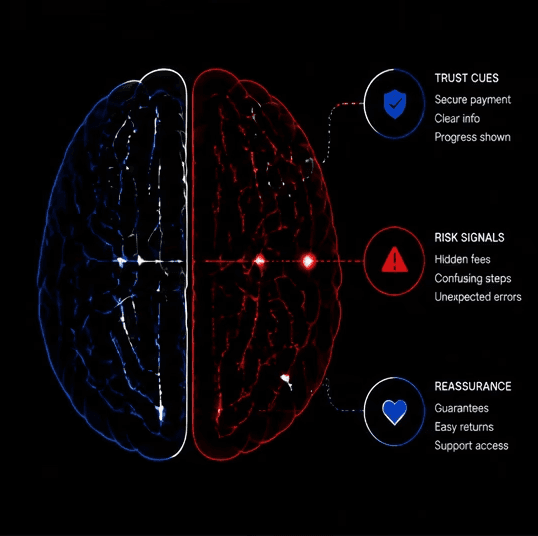
Trust signals don't add value, they remove doubt. Their conversion impact comes from neutralizing the specific fears that stop people from clicking through: "Is this site secure?", "Is this company legitimate?", "What if I'm not satisfied?" Understanding which signals address which fears is what makes placement decisions matter.
Scrubs and Beyond saw an 18.6% lift from trustmarks. JINS Eyewear saw 8.4%. Moz PRO ran a trust-building survey campaign that drove a 52% increase in sales and over $1 million in added revenue. The BaseKit pricing page test added testimonials and reorganized CTAs, resulting in 25% more conversions and a 274% revenue increase. These aren't marginal improvements; they're structural lifts from removing hesitation at the decision point.
Placement and what works for B2B versus e-commerce
Placement matters as much as the signal itself. Trust indicators perform best positioned near CTAs, on pricing pages, and at checkout, not buried in footers. For e-commerce, security badges, SSL indicators, and return policy guarantees reduce purchase anxiety at the point of payment. B2B buyers respond differently: case studies, recognized client logos, and ROI metrics signal competence and reduce vendor risk more effectively than security seals. Matching the signal to the fear, and positioning it where the fear peaks, is the difference between decorative credibility and a measurable conversion lift.
5. Navigation and layout: the friction that bleeds quietly
Navigation friction is subtler than a slow page or a broken form, but it drains conversions across every session. When visitors can't find what they need quickly, they leave. Heatmap data consistently shows how much cognitive load cluttered navigation creates, and how rarely teams are looking at it.
Research on decision paralysis shows that too many navigation options slow users down and increase exit rates. Reducing top-level navigation to the most conversion-relevant paths removes competing choices without removing value. Walmart's mobile redesign combined navigation simplification with speed improvements to produce that 20% mobile conversion lift. The two changes reinforced each other, which is exactly how navigation and layout improvements tend to work: they amplify the impact of everything else on this list.
Cutting visual clutter on landing pages
Fewer competing elements on a landing page means more focus on the primary action. This isn't an aesthetic preference, it's a behavioral outcome. When visitors have one clear thing to do, they do it more often. The nonprofit case study referenced earlier saw its 600% lift not just from CTA changes, but from removing the competing paths surrounding it. A better CTA surrounded by clutter still underperforms. Reduce the noise, and the signal gets louder.
6. How to prioritize what UX changes improve website conversions the most for your site
Not every change on this list will move the needle equally for every site. A B2B SaaS company with a complex demo request flow has different friction points than a DTC brand with a three-step checkout. The data in this article tells you which categories produce the largest lifts historically. Your site's specific behavior data tells you where your biggest gaps are right now.
Start with a UX audit to surface your highest-impact opportunities
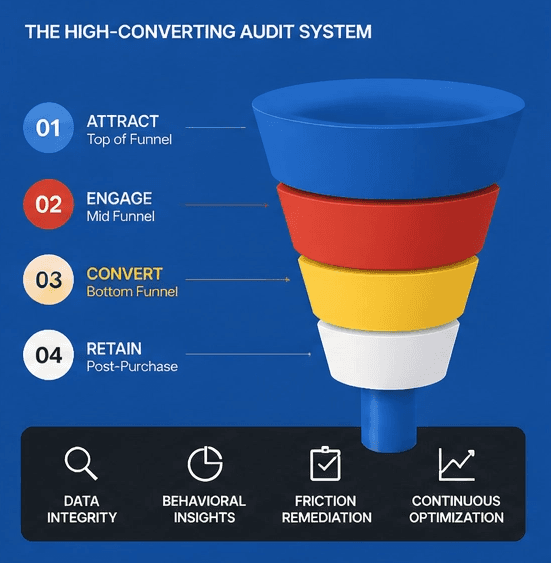
The fastest way to prioritize these changes is a structured UX audit: reviewing heatmaps, session recordings, funnel drop-off data, and form analytics before deciding what to test. A rigorous audit, the kind DEUX Labs runs for CRO clients, produces a ranked list of what's leaking the most conversions on your specific site, with behavioral evidence to support each recommendation. Generic best practices don't tell you whether your CTA is the problem or your form. Behavioral data does.
Build a simple A/B test plan around your top findings
Each UX change on this list should generate one clear hypothesis before any code gets written. The structure is straightforward: "If we change X, we expect Y outcome because Z behavioral insight." One change per test produces cleaner data and faster learning cycles. Track three metrics for most tests: conversion rate, bounce rate, and, where relevant, average order value. Statistical significance matters. A lift that disappears at scale wasn't real. Run tests long enough to account for weekly behavioral patterns before calling a winner.
Conversion rate: the primary measure of whether the change worked
Bounce rate: an early signal of whether the change improved or disrupted engagement
Average order value: relevant for e-commerce tests where higher friction sometimes filters for higher-intent buyers
Start with one change, not eleven
The businesses seeing 20, 50%+ conversion lifts aren't running complex, multi-variable overhauls. They're identifying the most obvious friction points through structured audits, testing one hypothesis at a time, and compounding the results. Across the case studies referenced here, spanning e-commerce, SaaS, nonprofit, and B2B contexts, CRO UX improvements consistently rank as the highest-ROI lever for converting existing traffic. Results will vary by site and context, but the opportunity exists across industries and traffic levels for teams willing to test methodically.
If you're serious about understanding what UX changes improve website conversions the most for your specific site, start with one category from this list. Form a hypothesis. Run the test. The results will tell you where to go next. For a structured starting point, DEUX Labs' free CRO Playbook walks you through the audit framework and test prioritization process we use across client engagements, built for teams ready to stop guessing and start optimizing with evidence.
More Insights
Explore ideas, tips, and trends to elevate your brand.